
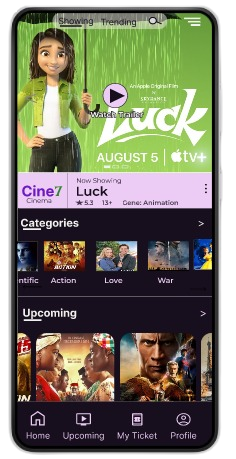


For everyone!
Research and design by:
Akande Nusirudeen K.
UI/UX Designer
Links: Digital Wireframe | User testing prototype
The Cine7 Cinema app is an app designed for cinema owners to allow their customers to book tickets online and at the same time, able to choose where to seat in the hall during the booking process.
December 2022 to April 2023.
Users find it difficult to book a movie ticket for their friends and family and are also unable to get a suitable seat for themselves in a row.
Design an app that will allow a user to book cinema ticket(s) and able to select a seat number(s) in the process.
UX designer designing a cinema app
Conducting interviews, paper and digital wireframing, low and high-fidelity prototyping, conducting usability studies, accounting for accessibility, and iterating on designs.
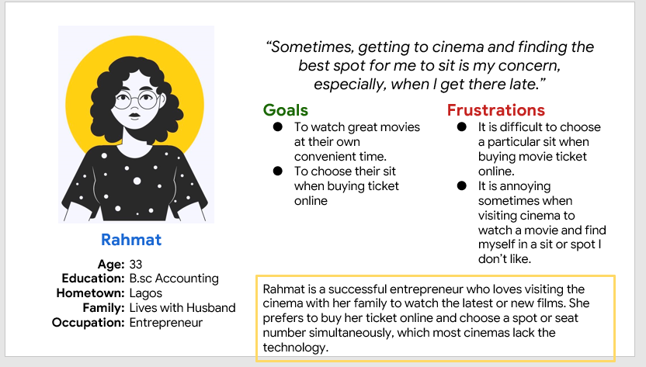
I conducted interviews and created empathy maps to understand the user I’m designing for and their needs. A primary user group identified through research was working adults who love going to the cinema to watch the latest movies
This user group confirmed the initial assumption about the movie app but research also revealed that choosing a seat when buying a ticket was limited to the user. Other user problems include being unable to watch a movie trailer and other challenges that make it difficult to achieve their goals.
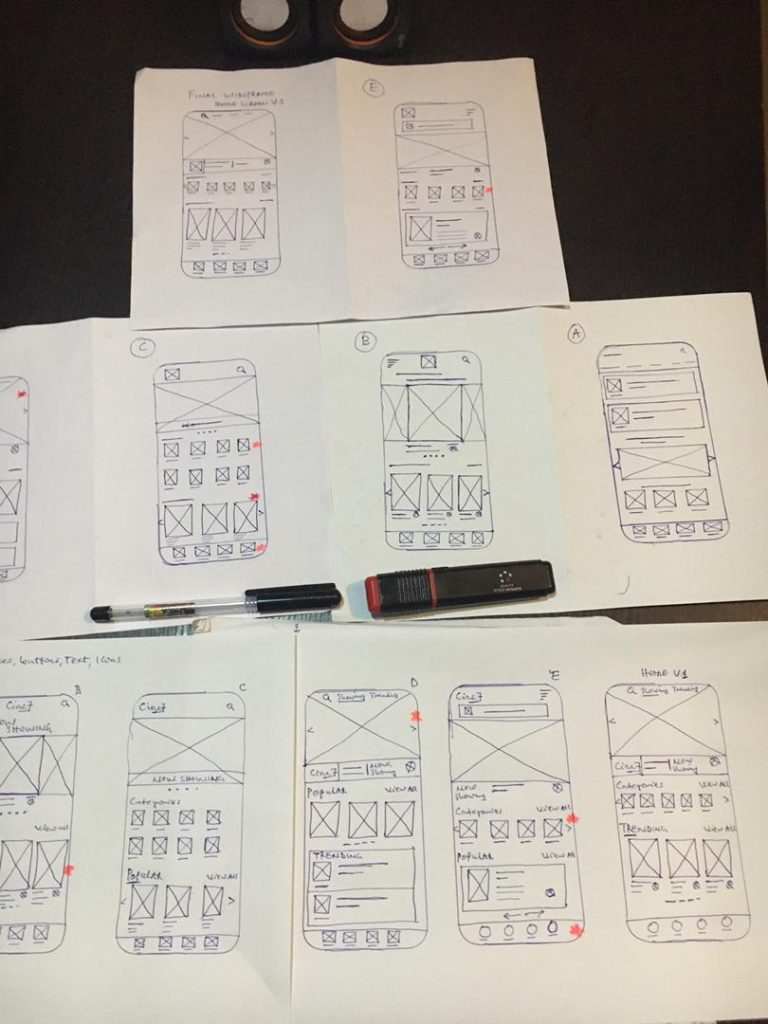
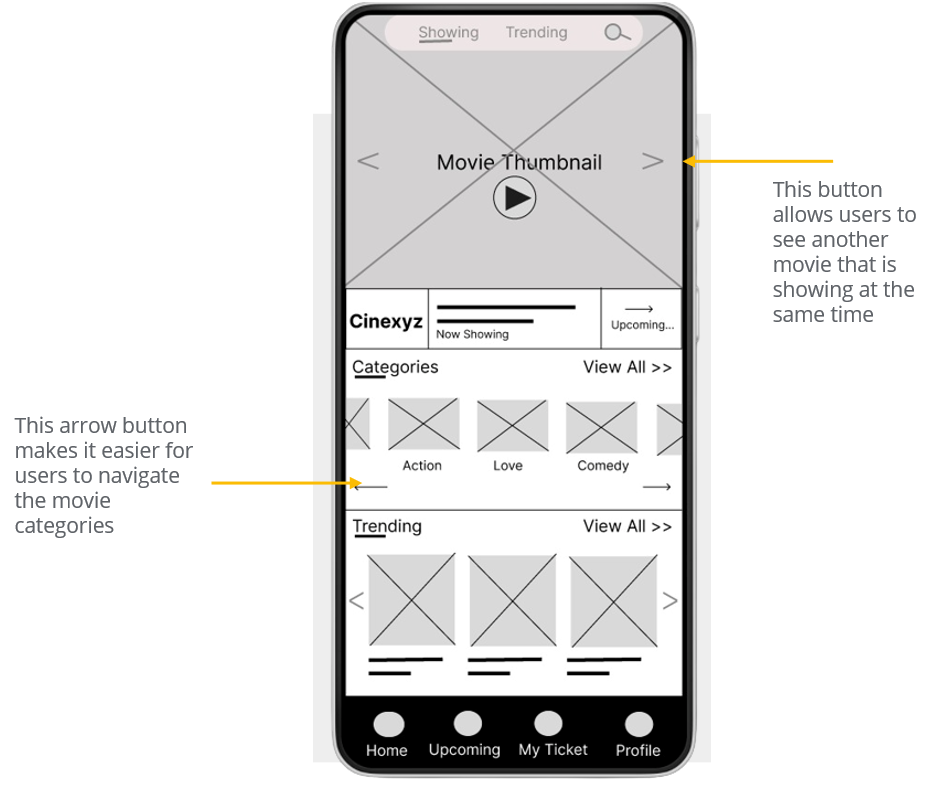
Taking the time to draft iterations of each screen of the app on paper ensured that the elements that made it to the digital wireframe would be well-suited to address user pain points. For the home screen, I prioritized a quick and easy way for users to find upcoming movies.
Stars were used to mark the elements of each sketch that would be used in the initial digital wireframes.
As the initial design phase continued, I make sure to base screen designs on feedback and findings from the user research.
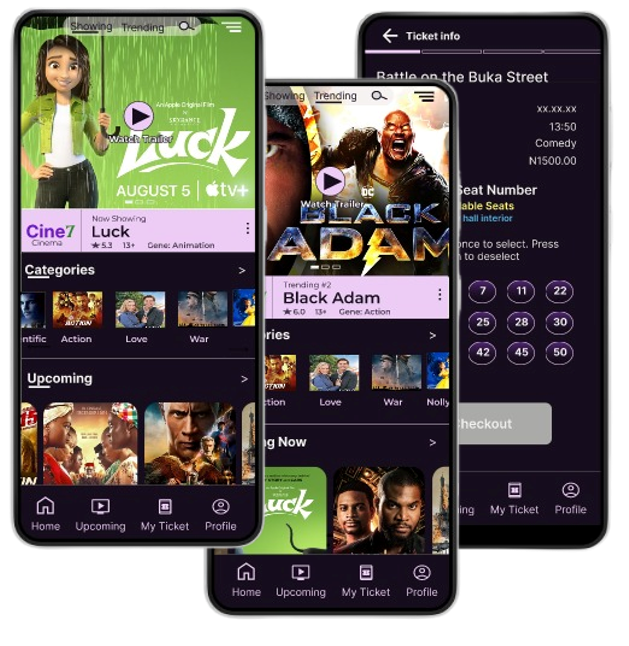
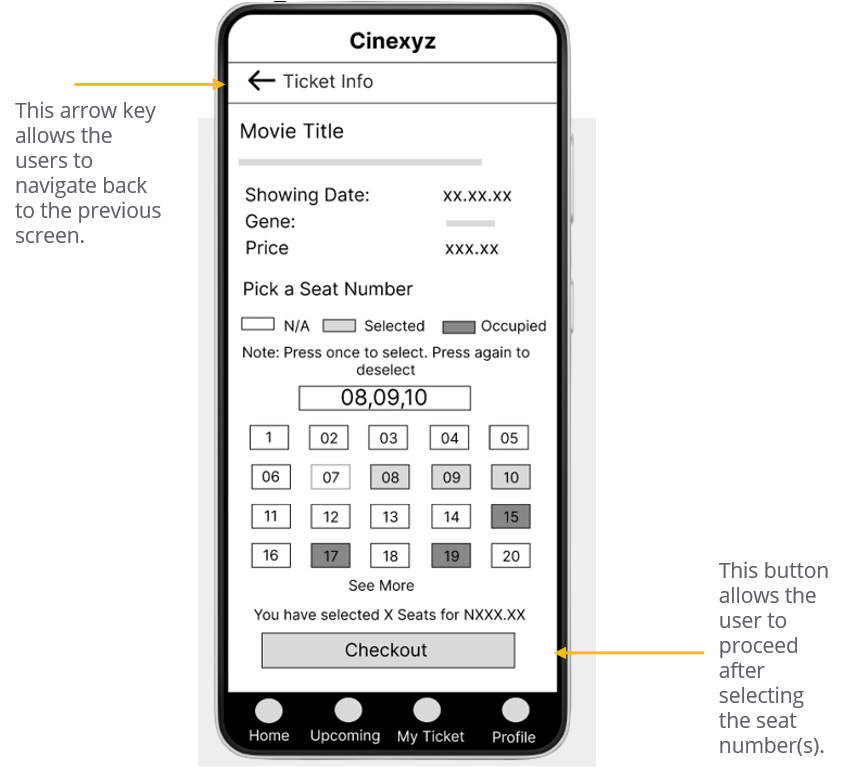
This screen satisfies the user’s pain point
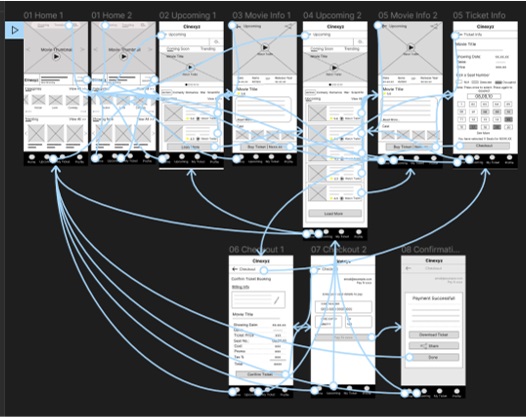
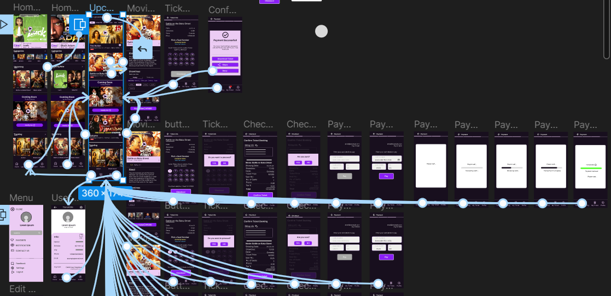
The low-fidelity prototype connected the primary user flow of selecting a movie and booking a ticket while at the same time choosing a seat number on the app. So the prototype could be used in a usability study with users.
View the Cinema app
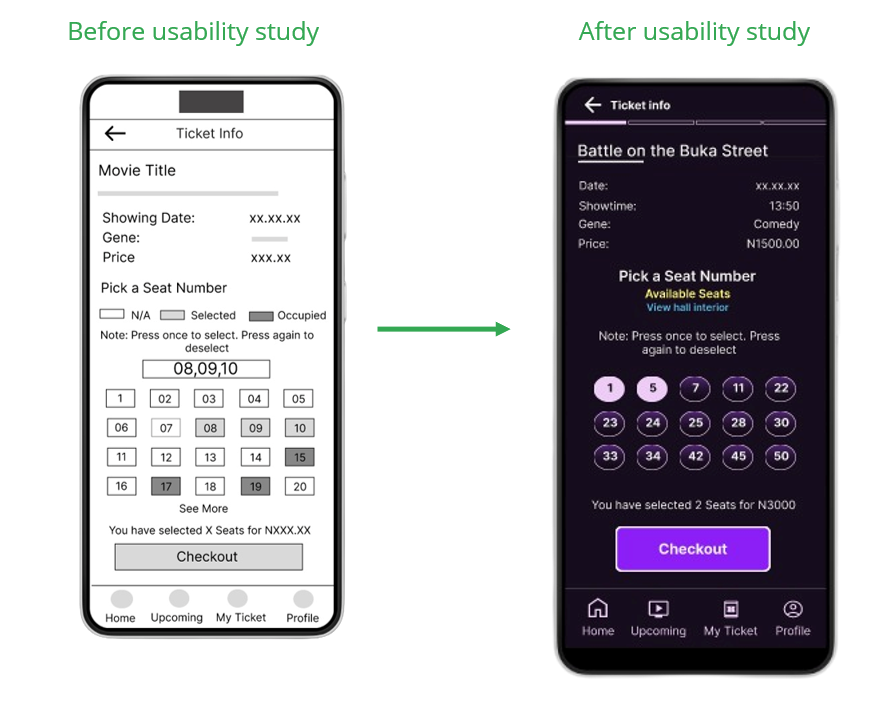
I created two rounds of usability studies. Findings from the first study help guide the designs from wireframes to mockups. The second study uses a high-fidelity prototype and revealed what aspect of the mockup needed refining.
Users need more adjustments to the typography.
Users are able to book ticket
Users suggested an adjustment to the navigation menus.
Users are able to complete a checkout process but the seat number buttons are not clickable and interactive.
Early designs allowed for some customization, but after the usability studies, the seat number screen was redesigned to make the number button more interactive. And also, users can be able to click on a link to see the interior of the hall.
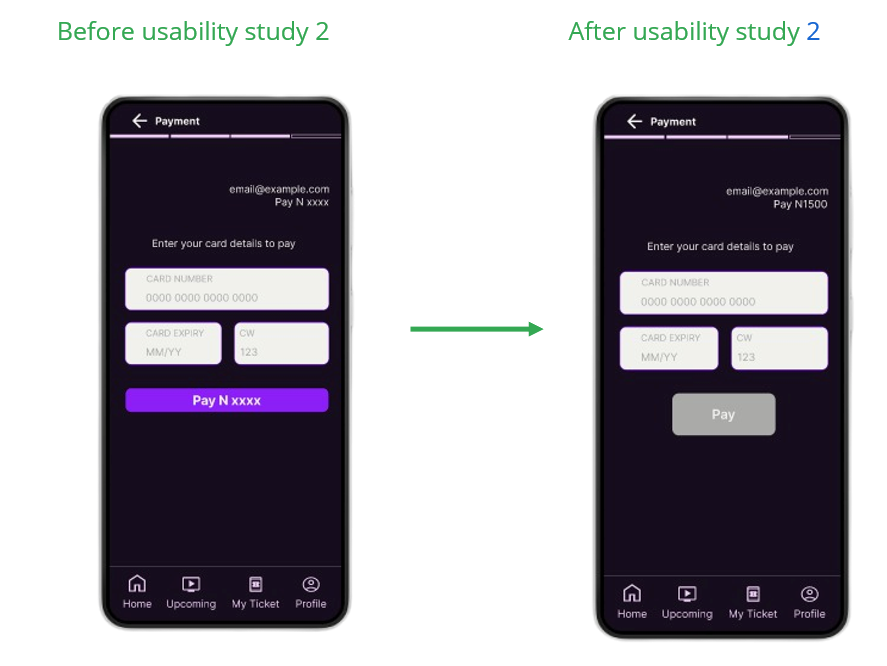
At the payment screen before the usability study, the Pay button is active even when no entry was found. A correction was made after usability study 2 by making the Pay button to be inactive until an entry is made.
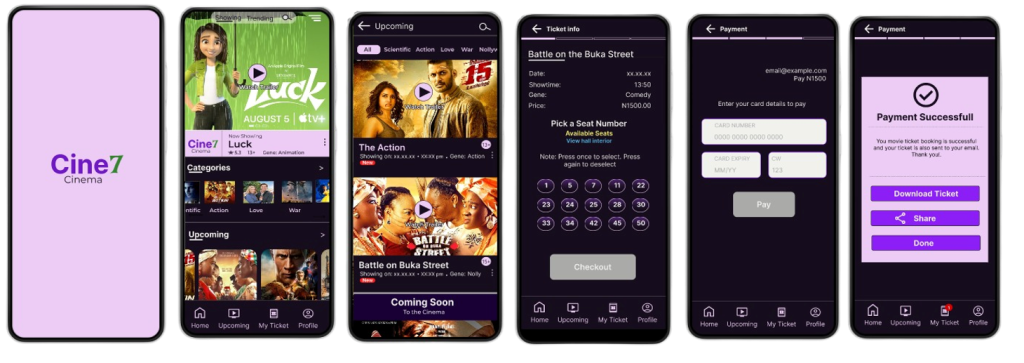
The final high-fidelity prototype presented cleaner user flows for booking a movie ticket and checkout. It also met the user’s need to select seat numbers during the booking checkout.
View the Cine7 Cinema app high-fidelity prototype
Don’t miss our future updates! Get Subscribed Today!
©2026. Kennydeen IT Solutions. All Rights Reserved.
| Cookie | Duration | Description |
|---|---|---|
| cookielawinfo-checkbox-advertisement | 1 year | Set by the GDPR Cookie Consent plugin, this cookie is used to record the user consent for the cookies in the "Advertisement" category . |
| cookielawinfo-checkbox-analytics | 11 months | This cookie is set by GDPR Cookie Consent plugin. The cookie is used to store the user consent for the cookies in the category "Analytics". |
| cookielawinfo-checkbox-functional | 11 months | The cookie is set by GDPR cookie consent to record the user consent for the cookies in the category "Functional". |
| cookielawinfo-checkbox-necessary | 11 months | This cookie is set by GDPR Cookie Consent plugin. The cookies is used to store the user consent for the cookies in the category "Necessary". |
| cookielawinfo-checkbox-others | 11 months | This cookie is set by GDPR Cookie Consent plugin. The cookie is used to store the user consent for the cookies in the category "Other. |
| cookielawinfo-checkbox-performance | 11 months | This cookie is set by GDPR Cookie Consent plugin. The cookie is used to store the user consent for the cookies in the category "Performance". |
| CookieLawInfoConsent | 1 year | Records the default button state of the corresponding category & the status of CCPA. It works only in coordination with the primary cookie. |
| elementor | never | This cookie is used by the website's WordPress theme. It allows the website owner to implement or change the website's content in real-time. |
| viewed_cookie_policy | 11 months | The cookie is set by the GDPR Cookie Consent plugin and is used to store whether or not user has consented to the use of cookies. It does not store any personal data. |
| Cookie | Duration | Description |
|---|---|---|
| __gads | 1 year 24 days | The __gads cookie, set by Google, is stored under DoubleClick domain and tracks the number of times users see an advert, measures the success of the campaign and calculates its revenue. This cookie can only be read from the domain they are set on and will not track any data while browsing through other sites. |
| _ga | 2 years | The _ga cookie, installed by Google Analytics, calculates visitor, session and campaign data and also keeps track of site usage for the site's analytics report. The cookie stores information anonymously and assigns a randomly generated number to recognize unique visitors. |
| _ga_9XQFGNGH2Y | 2 years | This cookie is installed by Google Analytics. |
| _gat_gtag_UA_232394360_1 | 1 minute | Set by Google to distinguish users. |
| _gid | 1 day | Installed by Google Analytics, _gid cookie stores information on how visitors use a website, while also creating an analytics report of the website's performance. Some of the data that are collected include the number of visitors, their source, and the pages they visit anonymously. |
| Cookie | Duration | Description |
|---|---|---|
| _fbp | 3 months | This cookie is set by Facebook to display advertisements when either on Facebook or on a digital platform powered by Facebook advertising, after visiting the website. |
| fr | 3 months | Facebook sets this cookie to show relevant advertisements to users by tracking user behaviour across the web, on sites that have Facebook pixel or Facebook social plugin. |
| IDE | 1 year 24 days | Google DoubleClick IDE cookies are used to store information about how the user uses the website to present them with relevant ads and according to the user profile. |
| test_cookie | 15 minutes | The test_cookie is set by doubleclick.net and is used to determine if the user's browser supports cookies. |
| Cookie | Duration | Description |
|---|---|---|
| GoogleAdServingTest | session | No description |
| ultp_view_1 | 1 day | No description |
| ultp_view_100 | 1 day | No description |
| ultp_view_1095 | 1 day | No description |
| ultp_view_1126 | 1 day | No description |
| ultp_view_1131 | 1 day | No description |
| ultp_view_1134 | 1 day | No description |
| ultp_view_1146 | 1 day | No description |
| ultp_view_1154 | 1 day | No description |
| ultp_view_1163 | 1 day | No description |
| ultp_view_1172 | 1 day | No description |
| ultp_view_1179 | 1 day | No description |
| ultp_view_1184 | 1 day | No description |
| ultp_view_1191 | 1 day | No description |
| ultp_view_1193 | 1 day | No description |
| ultp_view_1200 | 1 day | No description |
| ultp_view_1856 | 1 day | No description |
| ultp_view_2031 | 1 day | No description |
| ultp_view_2068 | 1 day | No description |
| ultp_view_2095 | 1 day | No description |
| ultp_view_2110 | 1 day | No description |
| ultp_view_2126 | 1 day | No description |
| ultp_view_2136 | 1 day | No description |
| ultp_view_2154 | 1 day | No description |
| ultp_view_2279 | 1 day | No description |
| ultp_view_29 | 1 day | No description |
| ultp_view_44 | 1 day | No description |
| ultp_view_47 | 1 day | No description |
| ultp_view_52 | 1 day | No description |
| ultp_view_73 | 1 day | No description |
| ultp_view_85 | 1 day | No description |
| ultp_view_879 | 1 day | No description |
| ultp_view_88 | 1 day | No description |
| ultp_view_883 | 1 day | No description |
| ultp_view_888 | 1 day | No description |
| ultp_view_898 | 1 day | No description |
| ultp_view_9 | 1 day | No description |
| ultp_view_92 | 1 day | No description |
| ultp_view_95 | 1 day | No description |
| ultp_view_98 | 1 day | No description |
| XID | 1 month | No description |
