
Does your business offer international services, but you’ve found it hard to connect with global customers in a personalized, cost-effective way? Do you, as a marketer, struggle with offering one-on-one experiences with customers when you’re not online?
Marketing messages are hard, right? But they don’t have to be. Allow me to introduce you to your new favorite app for customer relationships: WhatsApp.
Now, if you’ve just read that and thought, “WhatsApp? What’s that? And how is an app going to help?” That’s understandable.
Advertisement
WhatsApp has become the center of gravity for billions of users around the world. It’s where we message the people we care about most — like our friends and family.
Businesses always want to build relationships and meet customers where they are. WhatsApp can become one of the most important marketing channels.
Even though the app is the most popular global mobile messaging service, WhatsApp commonly isn’t known as a tool for businesses. For instance, just over 7% of marketers use WhatsApp for business.
However, while on the surface it may seem like WhatsApp is just another messaging service, there are tools built in the app that are great for maintaining strong customer relationships and cultivating lead generation.
But, what exactly is WhatsApp, and what does it do?
What is WhatsApp?
WhatsApp is a free mobile messaging app that allows users to communicate with friends and family. WhatsApp is used for group messaging, calls, and multimedia sharing, regardless of mobile device type. The app also allows for international communication between users.
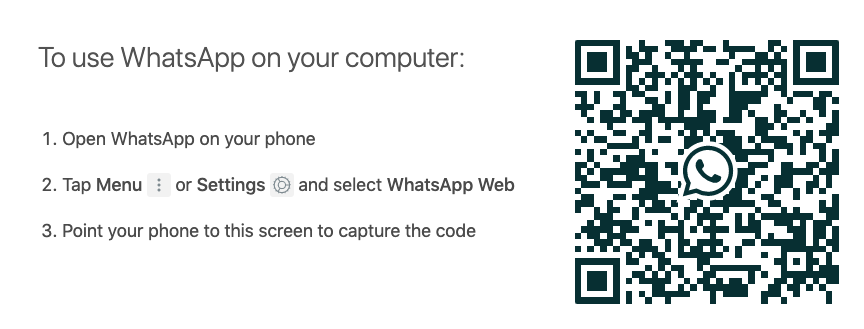
To use WhatsApp, you have to download the app on your phone, or scan the QR code from a computer with your phone’s camera. The app is available for desktop, but you need a phone in order to sign up.
WhatsApp is appealing because, in most cases, the app is free to use, depending on your phone service’s messaging rates. Additionally, it provides a centralized location for multiple group chats, multimedia sharing, and voice messaging.
Here, let’s explore some ways those benefits can be used in WhatsApp for marketing efforts.
Advertisement
WhatsApp for Business Marketing
If you want to remind your customers about promotions, offer accessible customer service options, or increase visibility, WhatsApp is a perfect tool for you. And, with the addition of WhatsApp Business, it’s now easier than ever to build positive customer relationships.
With WhatsApp Business, you’ll be able to offer personal customer support to your audience with automated messages and chatbot-like capabilities. So, if you’re launching a new product, WhatsApp can automatically send the messages you’ve created to the customers you select.
Think of selecting customers being synonymous with audience segmentation — which you can do in the app using a broadcast list.
Additionally, if you have a global audience or customer base, you’ll find it easy and cost-effective to connect with your international customers, since WhatsApp doesn’t charge a fee for international communication. This helps you strengthen customer relationships abroad, and allows for quick-problem solving.
Next, we’ll show you how you can use the tools provided in WhatsApp Business to make an effective WhatsApp marketing campaign.
Advertisement
How to create a WhatsApp Business profile
Making a WhatsApp Business account is easy, especially if you have the app already downloaded. If not, head over to your local mobile app store and type in “WhatsApp Business.” If you’ve already set up an account, the app will connect your account to a Business profile.
Next, accept the Terms and Conditions, and enter a phone number. (If you want to refrain from using your personal number, this is something you can change letter in Settings).
And then, you’re all set! You can make your Business account look polished and professional from here. You can also begin to explore some of the business-specific functions available to you, like contact labels and short links.
Let’s talk about some of the features you’ll have to work with in WhatsApp Business.
First, you can list your company’s contact information, such as email, address, and website link, in the “Business Profile” section, accessed by clicking “Business Settings”. If you’ve ever seen a Facebook or Google Business profile, they’re very similar. Your WhatsApp Business profile will be a quick view of your company.

Your Business profile will also be listed as one, so when you communicate with leads and customers, they will know they’re talking to your business. Another identifier for customers is a green checkmark:

You’ll see it added when your account is verified by WhatsApp, which involves the app making sure the information you’ve given to set up your profile is accurate.
You’ll also be able to use labels to organize sales functions, access messaging metrics (such as stats on when messages are sent, delivered, and read), and build a catalog of products from your business. We’ll get more into how these features can help your marketing strategy in the next section.
Read: How to Manually Remove Virus from your Android Phone
Advertisement
How to Use WhatsApp for Business
You can use WhatsApp for business efforts in a couple of different ways. Mainly, the app is used for communication and sharing, and that’s the basis of using WhatsApp to your advantage.
WhatsApp can be a powerful app to have in your toolkit. You can improve visibility, automate communication, and keep your workflow organized.
The app is also free to use and manage, so you won’t be spending money downloading new software. Let’s cover how some other ways to use WhatsApp as an asset for your company.
1. Improve your business’s visibility on Whatsapp business App
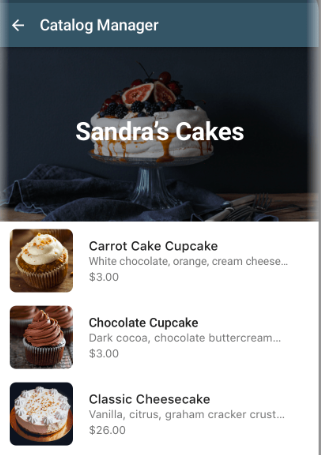
Similar to Facebook, WhatsApp allows businesses to have a Business page on the app. Your profile will offer important information for customers, such as location, description, website, and contact details. You can also add a catalog to your WhatsApp, like shown below:
Advertisement
The catalog tool lets you upload your products in bulk, so users can browse your offerings through the app. This tool is an easy way for customers to get an idea of what they can purchase from your business. Having a business page for your company increases the amount of possible customers who can interact with your business using the app.
For instance, let’s say your customers want to know what your business offers, but don’t feel like Googling it. If your catalog is set up, they’ll be able to access your offerings before their attention is diverted to something else.
You can use catalogs to display a new product line, or feature your most popular products to entice your audience members.
Advertisement
2. Lessen the response time.
When you use WhatsApp Business, you can engage with customers directly. You can also automate messages using a chatbot, so your audiences can have their questions answered quickly.
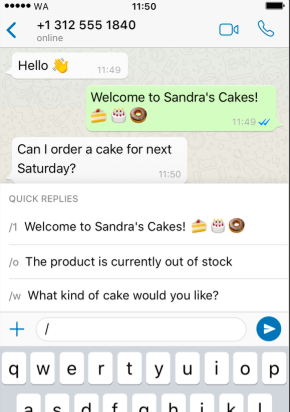
Notice how you can save a few quick replies for your customers. This interactive “FAQ” undoubtedly cuts down on having to type, or copy-and-paste answers to common questions.
Think about providing a content offer with quick replies. For instance, you might configure your welcome message to ask about your new offerings, (“Welcome! Would you like to know about our new sale?”), and include a quick reply that links back to your catalog, or another page or promotion.
Advertisement
3. Organize your duties.
WhatsApp offers different options for organization. First, you can organize your contacts using their label system. Alternatively, if you use a CRM that integrates with WhatsApp, like HubSpot, you can import your contacts directly from the CRM to the app, and manage conversations from there, like shown below:
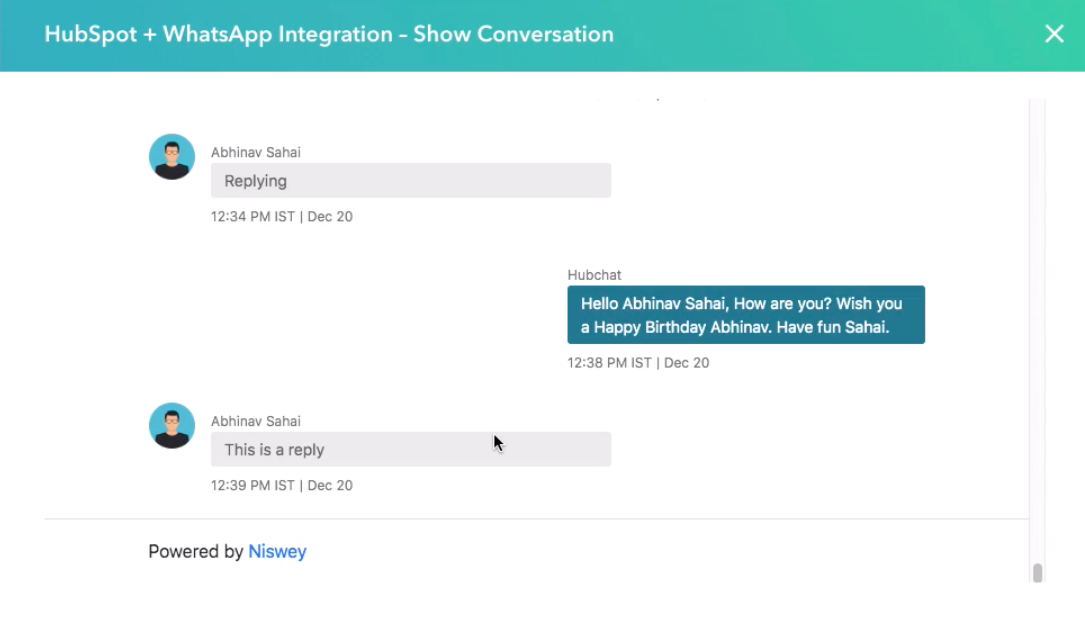
If you can integrate WhatsApp with your CRM, you won’t have to manually add contacts into the WhatsApp account. The two platforms will work together to import contact information onto your business dashboard.
Advertisement
Additionally, if you want to save the conversations you have with customers, you have that option with an integration. For example, HubSpot customers can access previous conversations on their HubSpot dashboard:
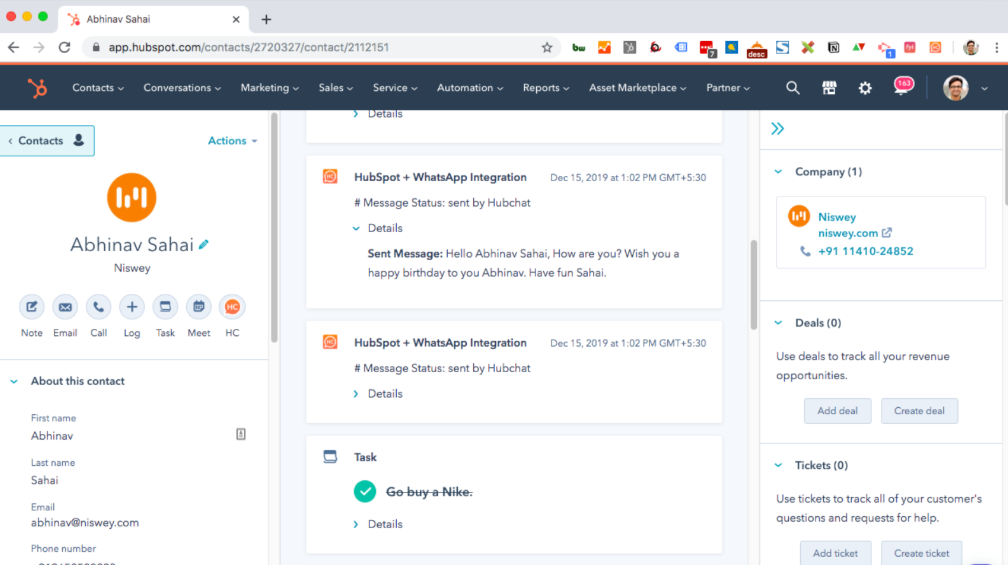
This will help you keep track of your customers and the relationships you grow with them. For more information about how to integrate your contact information with HubSpot, refer to this instructional post.
Advertisement

Comments are closed.